
15.5 Alerts
Reports → Alerts decides what sends an alert e-mail. Where alerts go is configured elsewhere:
| Channel | Configured under | Relationship to this page |
|---|---|---|
| Administration → Settings → Email (SMTP server, sender, default recipients) | Sent only for the triggers and rules enabled here. | |
| Syslog / SIEM (CEF or RFC 3164) | Administration → Settings → Syslog | Independent of this page. Every audit event (and the system events container status, audit chain broken, agent offline, agent online) is forwarded to each enabled syslog server whose scope (All logs / Selected events) includes it, whether or not an alert trigger is on. |
| Personal alert e-mails | Account (user menu) and Administration → Users | Users who opted in receive the same alert e-mails. |
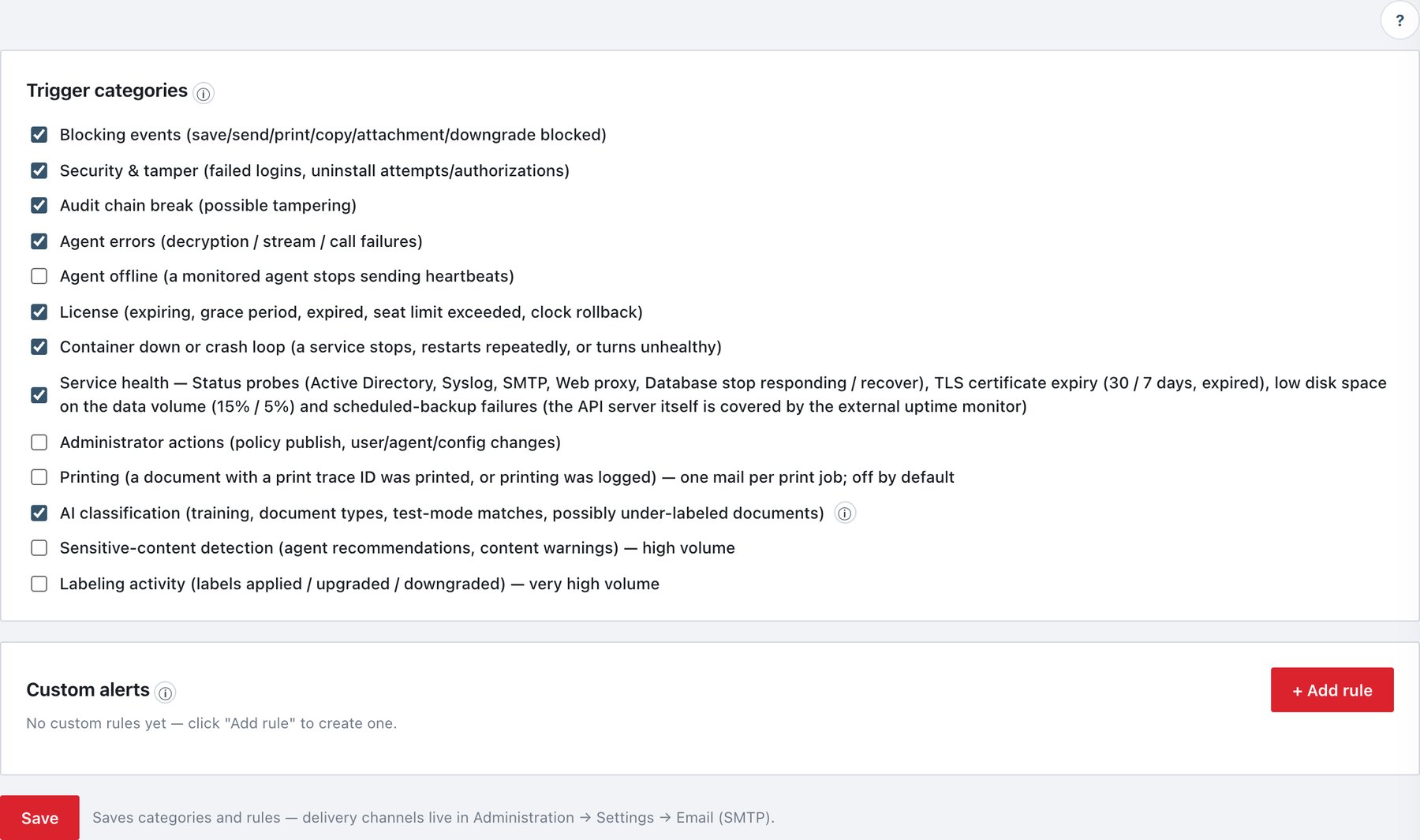
15.5.1 Trigger categories
| Checkbox (UI text, shortened) | Events | Default | Mail severity |
|---|---|---|---|
| Blocking events | Every blocking event | On | warning |
| Security & tamper | Every Security-category event | On | error |
| Audit chain break | Chain verification failed | On | critical |
| Agent errors | decryption_failed, streams_failed,
calls_failed, agent_command_failed |
On | error |
| Agent offline | An agent that was online stops sending heartbeats for 180 s (checked every 30 s; one mail per transition, listing all machines that went offline together) | On | warning |
| License | Expiring, grace period, expired, seat limit exceeded, clock rollback, bound to another installation, invalid | On | error (expired: critical) |
| Container down or crash loop | A server container stops, restarts repeatedly or turns unhealthy, and when it recovers | On | — |
| Service health | Active Directory, Syslog, SMTP, web proxy, database stop responding / recover; NTP clock drift; TLS certificate expiry (30 days → warning, 7 days → error, expired → critical); data-volume free space below 15 % (warning) / 5 % (error); scheduled-backup failures; failed service start/restart from Status | On | error; recovery = notice |
| Administrator actions | Policy publish, console user changes, agent commands and group changes, configuration changes (alerts, directory, time, security), backups, licence and service actions | Off | notice |
| Printing | print_traced, print_logged — one mail per
print job |
Off | notice |
| AI classification | Training failed (error) or completed, document type created or deleted (warning), test-mode rule matched (at most one mail per rule per calendar day, carrying the day’s count), and possibly under-labeled documents (AI ≥ 90 % sure the document deserves a higher label) | On | see text |
| Sensitive-content detection | Agent recommendations, unlabeled-file findings, content warnings shown / acknowledged / cancelled — high volume | Off | notice |
| Labeling activity | Every Labeling-category event — very high volume | Off | notice |
The subject of a category alert is ADA Alert — <category>: <event name>. Service-health mails say DOWN or RECOVERED in the subject (ADA Alert — Service health: SMTP · Email RECOVERED). Mails contain a text part and an HTML card with the fields of the matching audit record.
Certificate and disk reminders. While a certificate or the disk stays in the same bad band, the alert repeats at most once a day; a change of band alerts immediately, and a return to normal sends one “resolved” mail.
15.5.2 Custom alerts
Custom rules fire on exactly the events you pick and/or on a text match, independently of the categories above (a rule fires even when its category is off).
- Click + Add rule.
- Fill the drawer and click Save (this updates the page draft only).
- Click Save at the bottom of the page to persist.
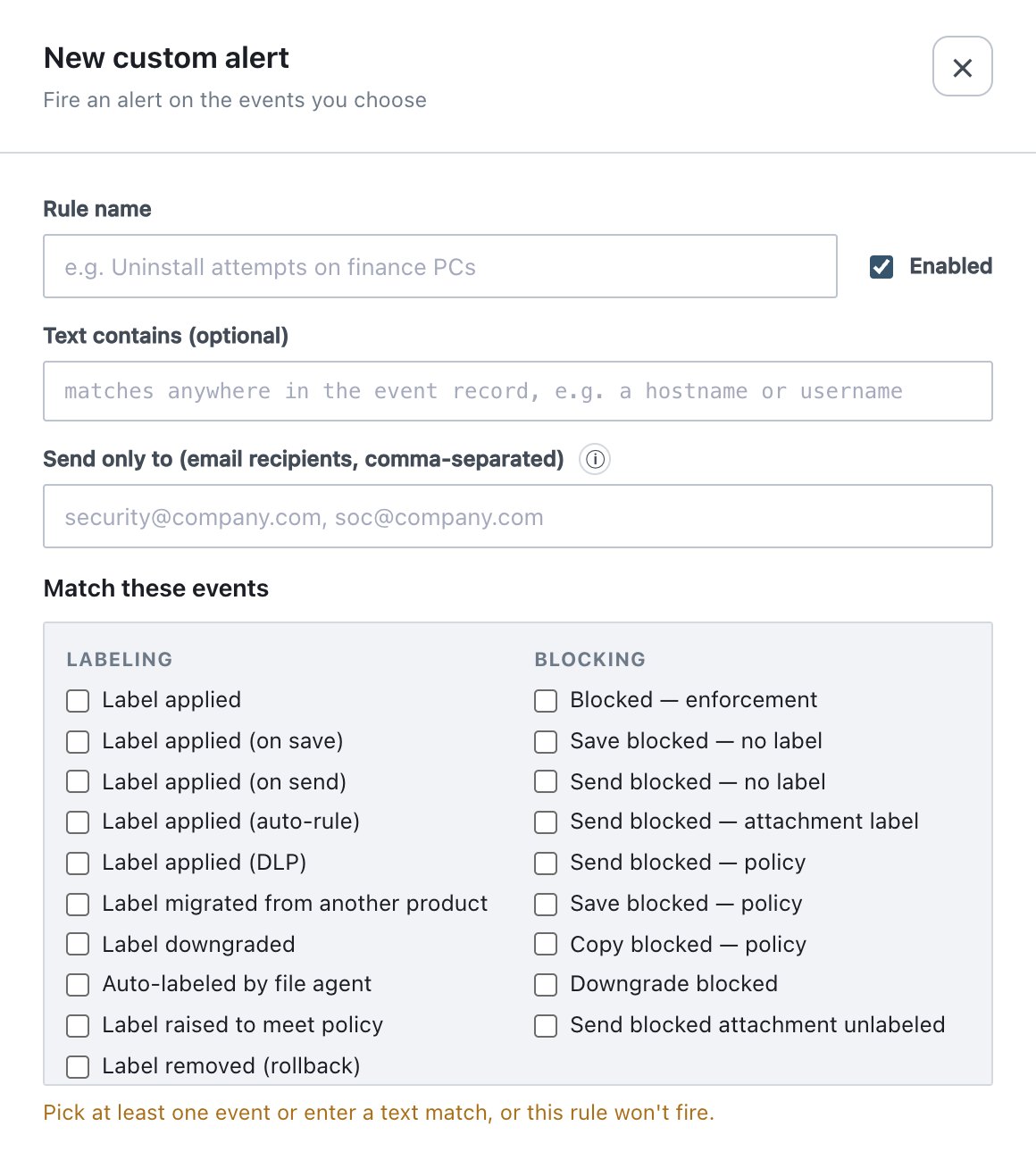
| Field | What it does | Default / allowed values |
|---|---|---|
| Rule name | Name shown in the list and in the mail subject (ADA Alert — <rule name>). | empty (“Untitled rule”) |
| Enabled | A disabled rule never fires. Also switchable on the list row. | On |
| Text contains (optional) | Case-insensitive substring searched in the whole audit record (e.g. a host name or user name). Can be used alone. | empty |
| Send only to | E-mail addresses for this rule only; replaces the global recipients. Empty = global recipients from Settings → Email. Same SMTP server either way. | empty |
| Match these events | Event checkboxes, grouped: Labeling, Blocking, Detection, AI classification, Content warnings, Masking, Printing & screen watermark, Security & tamper, Agent errors, Administration, Agent operations, License, System. Selected events appear as removable chips. | none |
A rule matches when the event is one of the selected events (if any are selected) and the record contains the text (if text is set). A rule with neither shows the no criteria badge and never fires. One event can fire several rules; each sends its own mail.
15.5.3 Saving and behaviour
- Category switches, rules and rule switches are a draft until the bottom Save button. Save re-reads the server configuration first and changes only triggers and rules, so SMTP and syslog settings edited elsewhere are not overwritten.
- Saving writes
alert_config_changed. The alert configuration is part of configuration backups (section Alerts). - Storm protection: a category alert sent less than 3 seconds after the previous alert is dropped (a line suppressed by storm protection is written to the SMTP log under Administration → System). Custom rules, chain break, container, service-health, agent-offline, certificate, disk and every category alert of error severity or worse are exempt.
- Auditors can open the page and the rule drawer but cannot change anything.