
6.8 Security
Administration → Settings → Security. The console security policy: lock-out, network restrictions, sign-in notice, local account use, password re-confirmation, sessions, local password rules, agent enrolment and two client-side rules. Behaviour that used to be fixed in the product is now visible and adjustable here.
The page is split into four groups, selected with the buttons at the top (remembered per browser): Sign-in & access, Sessions, Passwords, Agents & enforcement. One Save bar at the bottom saves all groups together.
Rules that apply to the whole page
- Clamping: the server forces each value into its allowed range. The console can make the policy stricter but never weaker than the built-in floor (for example, passwords never shorter than 8, sessions never longer than 24 hours). After Save, the stored values are shown, so a clamped value is visible at once.
- 0 means off for idle timeout, concurrent sessions, password history, maximum password age, stale-policy days and justification length.
- The defaults reproduce the product’s former fixed behaviour, so upgrading changes nothing until you edit here.
- Saving always asks for your password. Five wrong confirmations within 15 minutes block further confirmations for that user for 15 minutes.
- Auditors can read the page; the cards are locked and the Save bar is hidden.
- Audit event
security_config_changedlists every changed section with old and new values.
Sign-in & access
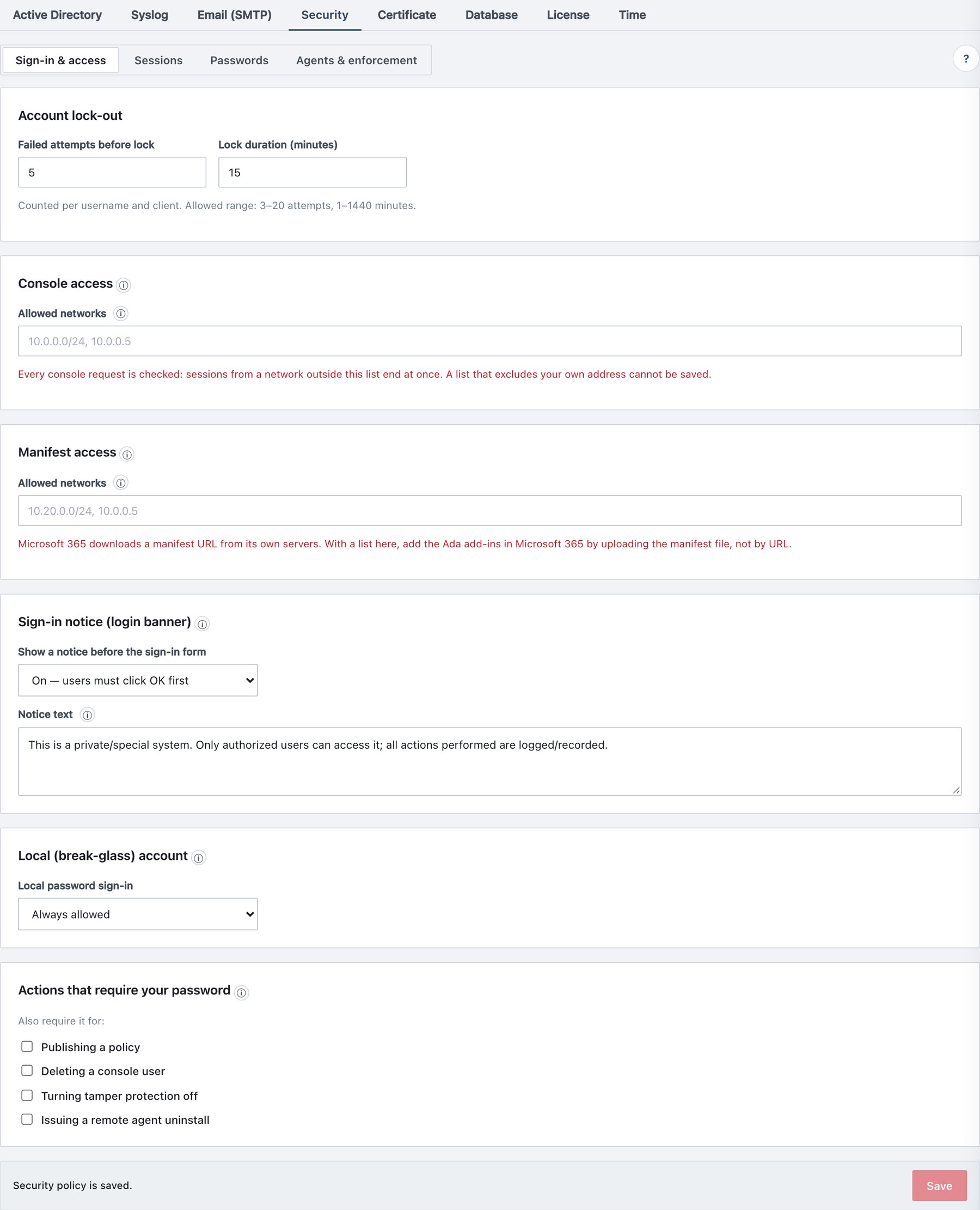
| Card / field | What it does | Default / allowed values |
|---|---|---|
| Account lock-out → Failed attempts before lock | Failed sign-ins before the account is locked for this client. | 5; 3–20. |
| Account lock-out → Lock duration (minutes) | Lock period. | 15; 1–1440. |
| Console access → Allowed networks | Networks allowed to use the console. | Empty = no restriction. Comma-separated IPv4 addresses and IPv4 CIDR ranges (other entries match only by exact text); up to 50 entries. |
| Manifest access → Allowed networks | Networks allowed to download the Office add-in manifests
(manifest-*.xml) from port 443. |
Empty = no restriction. IPv4 addresses, IPv4 CIDR ranges or IPv6 addresses; up to 50. Invalid entries are refused. |
| Sign-in notice → Show a notice before the sign-in form | “Authorised use only” notice the user must acknowledge with OK before the form appears. | On — users must click OK first (default) / Off — go straight to the form. |
| Sign-in notice → Notice text | Text of the notice. | Up to 2000 characters. Empty restores the built-in sentence. |
| Local (break-glass) account → Local password sign-in | Whether local accounts may sign in while AD is configured. | Always allowed (default) / Only when Active Directory is unreachable. |
| Actions that require your password | Additional actions that need password re-entry. | All off: Publishing a policy, Deleting a console user, Turning tamper protection off, Issuing a remote agent uninstall. |
Details:
- Lock-out is counted per user name and client address. The lock is checked before any AD bind, so a locked client cannot hammer the domain controller (and cannot trigger AD account lock-outs through Ada). Failed AD passwords count like local ones. Per address, the sign-in endpoint is additionally rate-limited.
- Console access is checked on every
console request, not only at sign-in. A session used from a network
outside the list is ended at once (event
admin_session_ip_blocked) and must sign in again from an allowed network. A list that excludes the address you are connected from cannot be saved (Your current address (…) is not in the allow-list — saving it would end your session and lock you out.). Agents, add-ins and client endpoints are never affected. - Manifest access does not affect the Ada add-in
panels (Office loads them wherever users are), and Ada’s own server
always has access. Client setup on Windows and Mac downloads these
manifests, so include every network where setup runs. Blocked downloads
are written to the audit log (
manifest_ip_blocked) once per address per day. Microsoft 365 fetches a manifest URL from Microsoft’s own servers: with a list here, add the add-ins in Microsoft 365 by uploading the manifest file, not by URL. - Sign-in notice: the built-in text is not in English. If your users read English, enter your own wording.
- Only when Active Directory is unreachable refuses local accounts while the DC answers (Local accounts can sign in only while Active Directory is unreachable — sign in with your directory account.). When the DC cannot be reached, local accounts work, so you can never lock yourself out. There is deliberately no “never” option. The setting has no effect while AD is disabled.
- Always required, regardless of the ticks: saving this security policy, backup restore, configuration export and import, full backup download, creating or rotating the scheduled-backup key, audit purge, licence install, client-certificate install or import, and restarting the API or web service. With a tick, the server refuses the extra action without your password; the console prompts for it.
- AD administrators confirm with their AD password, which needs the DC. During a directory outage, use a local administrator for these actions.
Sessions
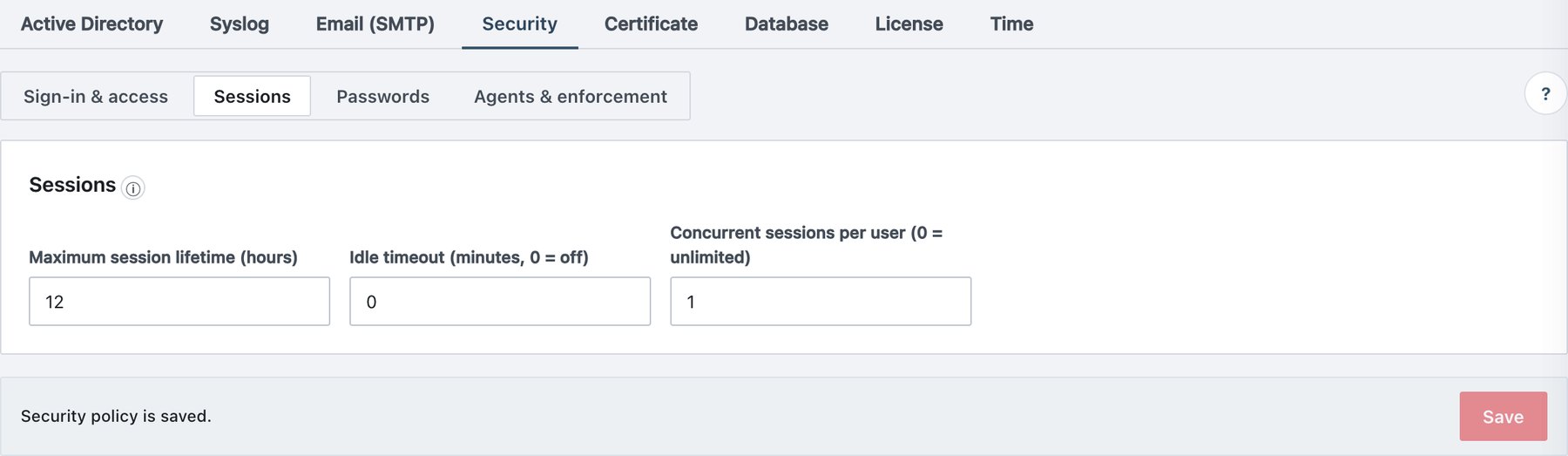
| Field | What it does | Default / allowed values |
|---|---|---|
| Maximum session lifetime (hours) | Absolute lifetime of a console session, local or AD. | 12; 1–24. |
| Idle timeout (minutes, 0 = off) | Ends a session that made no request for this long. | 0 (off); 5–480 (1–4 are raised to 5). |
| Concurrent sessions per user (0 = unlimited) | Sessions one user may hold. | 0; 1–20. |
- When the concurrent limit is reached, the oldest session of that user is signed out; a new sign-in is never refused.
- While a console page is open it refreshes counters every minute, and those requests count as activity. The idle timeout therefore ends sessions whose tab was closed or whose computer slept, not an open but unattended tab.
- Sessions are held in server memory. Restarting the API service signs everyone out.
Passwords
Rules for local console passwords. AD accounts follow the domain’s policy.
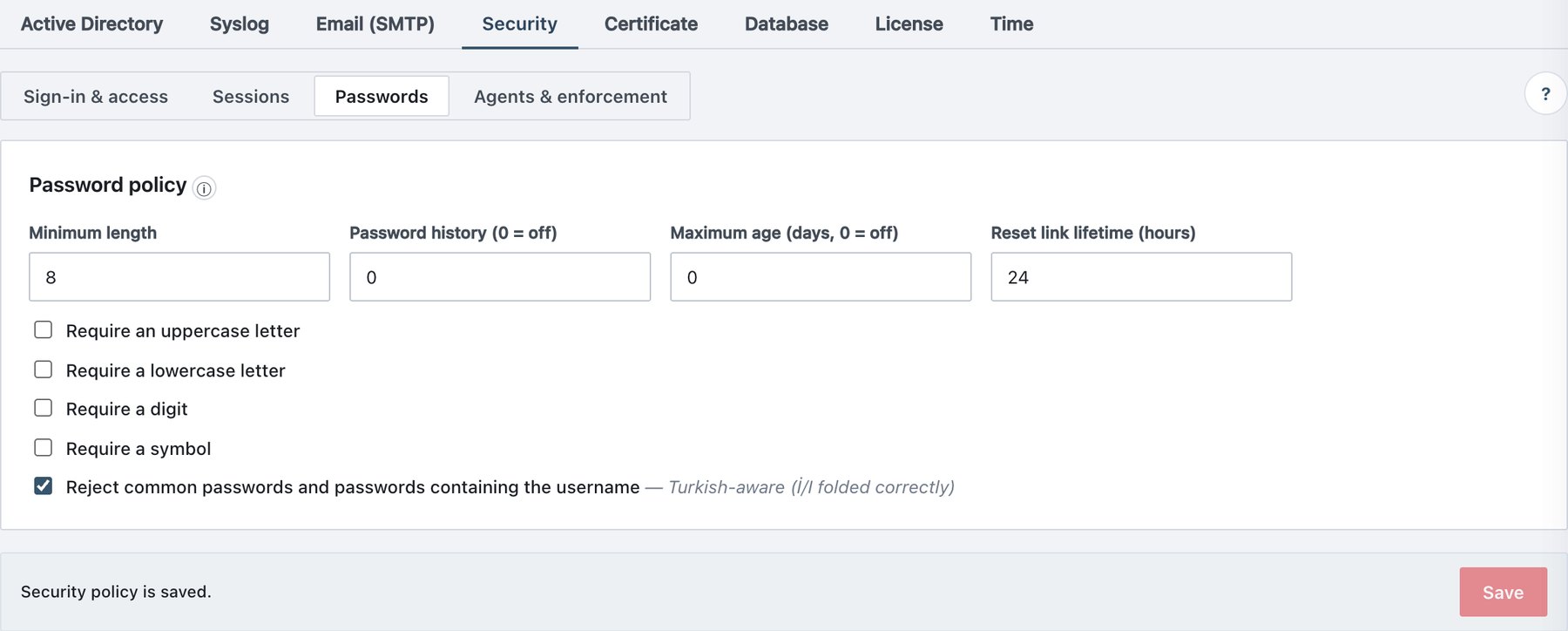
| Field | What it does | Default / allowed values |
|---|---|---|
| Minimum length | Shortest allowed password. | 8; 8–64. |
| Password history (0 = off) | The last N passwords cannot be reused. | 0; 1–24. |
| Maximum age (days, 0 = off) | Password expiry. | 0; 30–365 (1–29 are raised to 30). |
| Reset link lifetime (hours) | Validity of password-setup and reset links. | 24; 1–168. |
| Require an uppercase letter | Any Unicode uppercase letter. | Off. |
| Require a lowercase letter | Any Unicode lowercase letter. | Off. |
| Require a digit | Any digit. | Off. |
| Require a symbol | Any character that is not a letter or digit. | Off. |
| Reject common passwords and passwords containing the username | Blocks a built-in list of common passwords and any password containing the user name (if the user name has 3+ characters). Case folding handles the dotted/dotless I correctly. | On. |
- The rules apply when a password is set: on the password-setup/reset link page, on Account → Change Password and at a forced change. Existing passwords are not re-checked, except by Maximum age.
- The minimum length and character rules are shown to users on the password pages.
- With Maximum age, a local user whose password is older signs in to the change-password screen and must choose a new password before anything else opens.
- A new Reset link lifetime applies to links issued afterwards.
Agents & enforcement
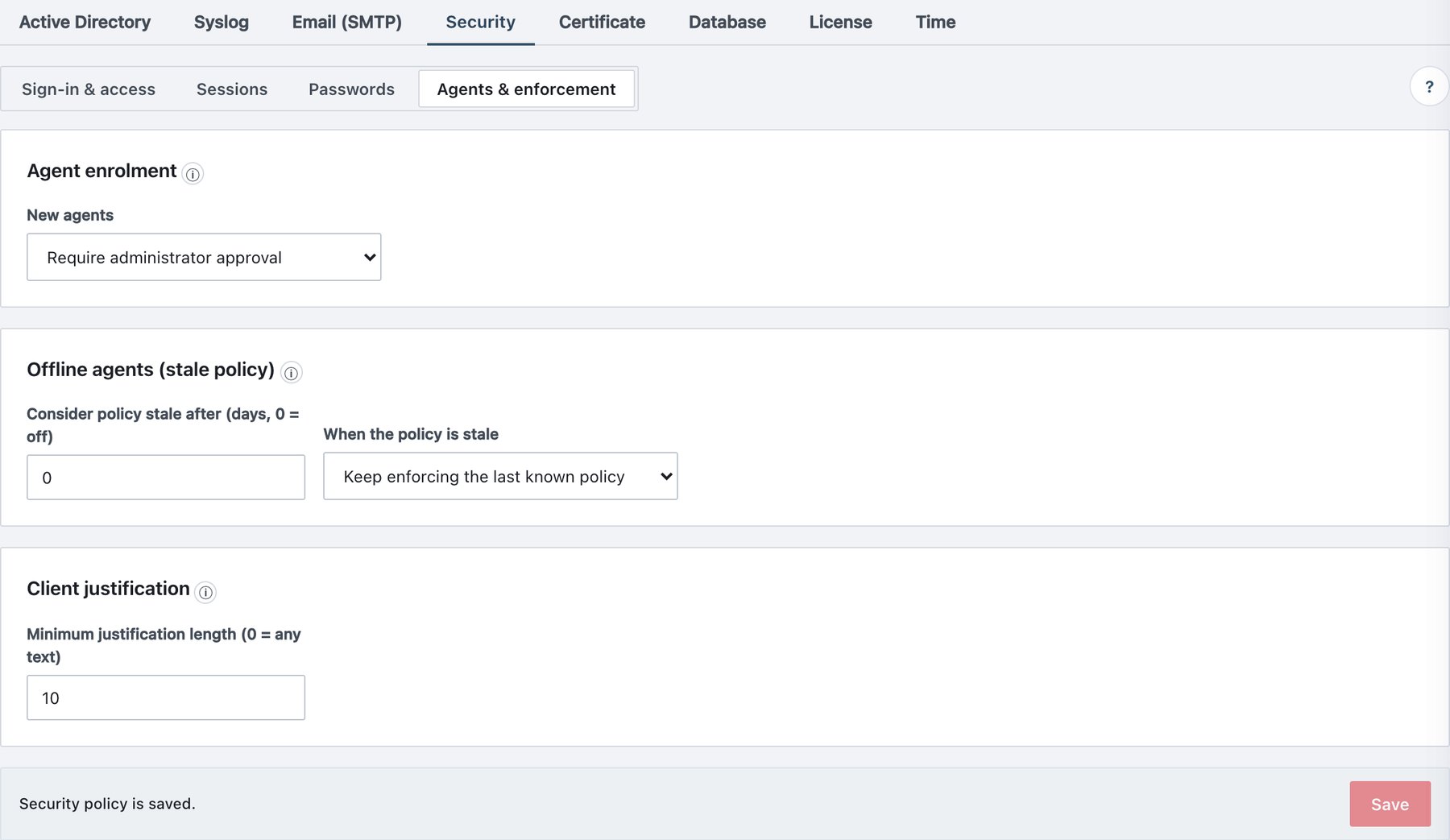
| Card / field | What it does | Default / allowed values |
|---|---|---|
| Agent enrolment → New agents | Whether a newly installed agent joins automatically. | Join automatically (a valid token is enough) (default) / Require administrator approval. |
| Offline agents (stale policy) → Consider policy stale after (days, 0 = off) | Days without reaching the server after which an agent treats its policy as stale. | 0 (off); 1–90. |
| Offline agents (stale policy) → When the policy is stale | Behaviour while stale. | Keep enforcing the last known policy (default) / Switch to the strictest restrictions (fail-closed). |
| Client justification → Minimum justification length (0 = any text) | Minimum length of every reason a user must type. | 10; 5–500 (1–4 are raised to 5). 0 accepts any non-empty text. |
- Enrolment: each agent enrols with the setup token
and receives its own key-bound certificate (one year, renewed
automatically 30 days before expiry, re-enrolled automatically with the
stored token if a renewal was missed). With approval required, a new
machine stays passive (no policy, no commands) until
you approve it on Agents; this makes a stolen setup
token useless on its own. Agents already registered are not affected.
Approval writes
agent_approved. - Strictest means: while stale, the agent requires a label on save, send and print, blocks unlabelled attachments and sets the Outlook send mode to Block. Keep enforcing avoids surprises for travelling users.
- Justification applies to every required justification: downgrading a label, overriding a copy/send block, and rule warnings that require a reason.
- The stale-policy and justification settings travel inside the signed policy. Saving a change re-signs the policy automatically; agents receive it at their next sync. They are enforced by agents 1.3.81 and later on Windows (Office add-ins and desktop classifier), macOS and the Office web add-ins.