15.3 Audit Log
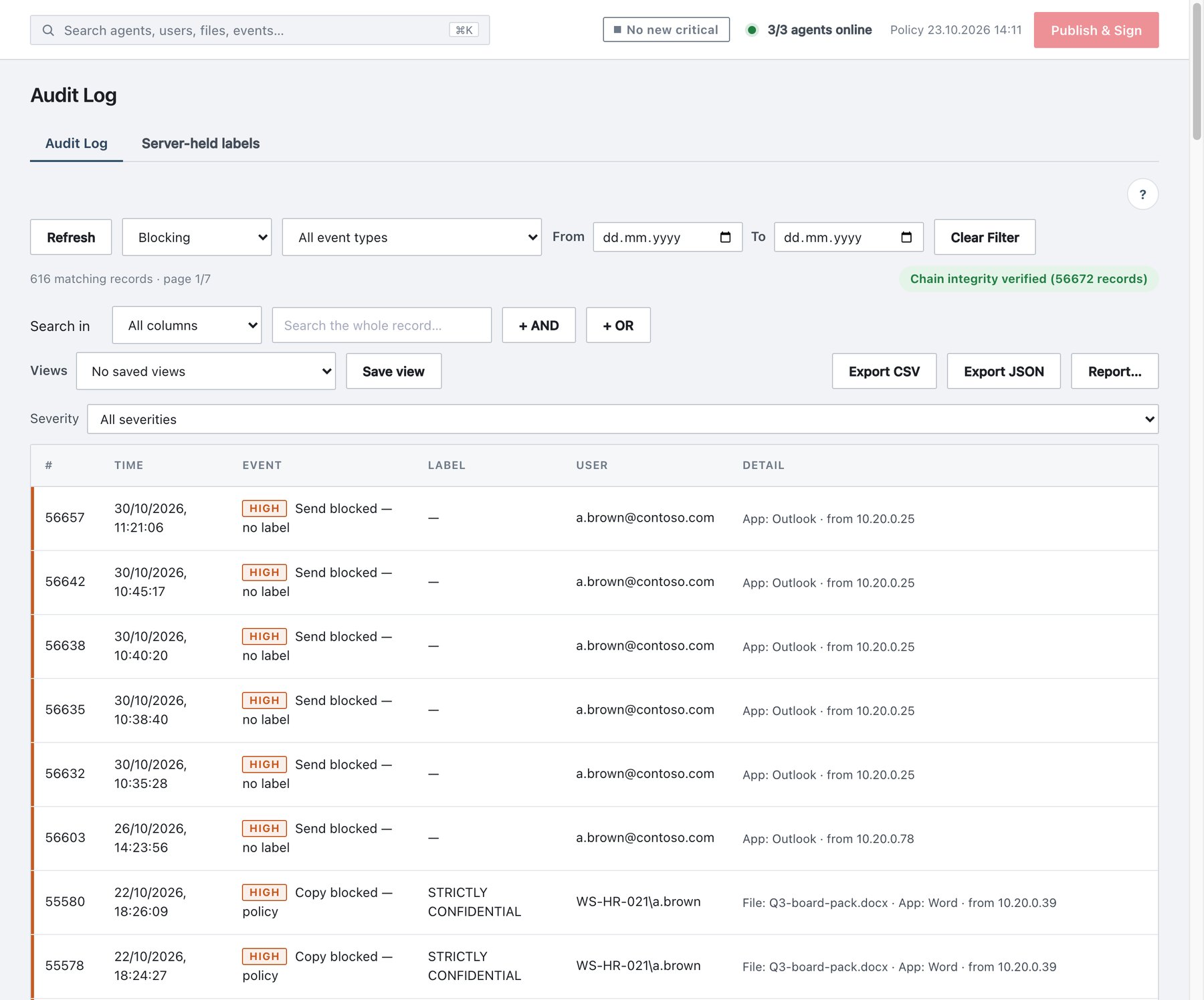
Activity → Audit Log lists every audit record, newest first, 100 per page. All filtering runs on the server against the whole history, so “N matching records” and the page count describe the full filtered set.
The page has two sub-tabs: Audit Log (described here) and Server-held labels (section 15.3.9).
15.3.1 What each row shows
| Column | Content |
|---|---|
| # | Sequence number in the hash chain. |
| Time | When the server received the record, in the configured time zone (full UTC timestamp in the tooltip). |
| Event | Severity tag (Critical / High / Medium / Low / Info) and the event’s display name, e.g. Save blocked — no label. |
| Label | Label name, or Label Sub-label. If a record carries only a label id, the name is resolved from the current policy; an id that cannot be resolved shows Unknown label (raw GUIDs are never shown). |
| User | The actor: who did it. For console actions this is the administrator; the object acted on appears in Detail as Target:. |
| Detail | Everything else, in a fixed order: Target, File (name/path; tooltip shows the full path), Item (mail subject), App, sign-in method and failure reason, attachment, “Active Directory unreachable”, role, source IP (from …), service, TLS details (scope, CN, issuer, expiry, SHA-256 fingerprint, key type), command, originating agent, trace: code, rule:, suggested: label (kept/changed), mail rule, AI document type and score, overlay gap (off screen: Ns), always-on watermark, session, message; plus the finding summary (IBAN×3, or Rule (AI: payroll 98%)), masked surfaces (body, subject), change lines of a policy publish (Rule added: IBAN) and the justification. |
The Detail text is produced by the same server function that writes the Detail column of CSV exports and PDF reports, so a record reads the same on all three surfaces.
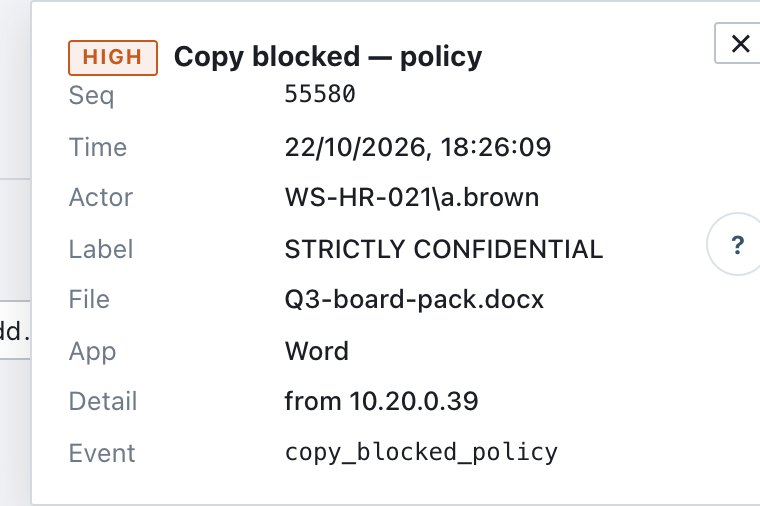
Click a row to open the Event details pane: Seq, Time, Actor, Label, File, every detail field on its own line, Justification and the raw Event id. Click the row again or ✕ to close it.
15.3.2 Filters
| Control | What it does | Values / notes |
|---|---|---|
| Refresh | Reloads the page and re-verifies the chain. | — |
| Category | Limits to one of the 12 categories. | All categories (default) or a category. |
| Event type | Limits to one exact event. The list is built from the events that actually occur in the log, grouped by category, each with its record count. | All event types (default). See the Note below. |
| From / To | Date range (calendar days in the configured time zone). Either end may be empty. | empty |
| Day: chip | Appears when you arrive from a single-day drill-down. ✕ removes it. | — |
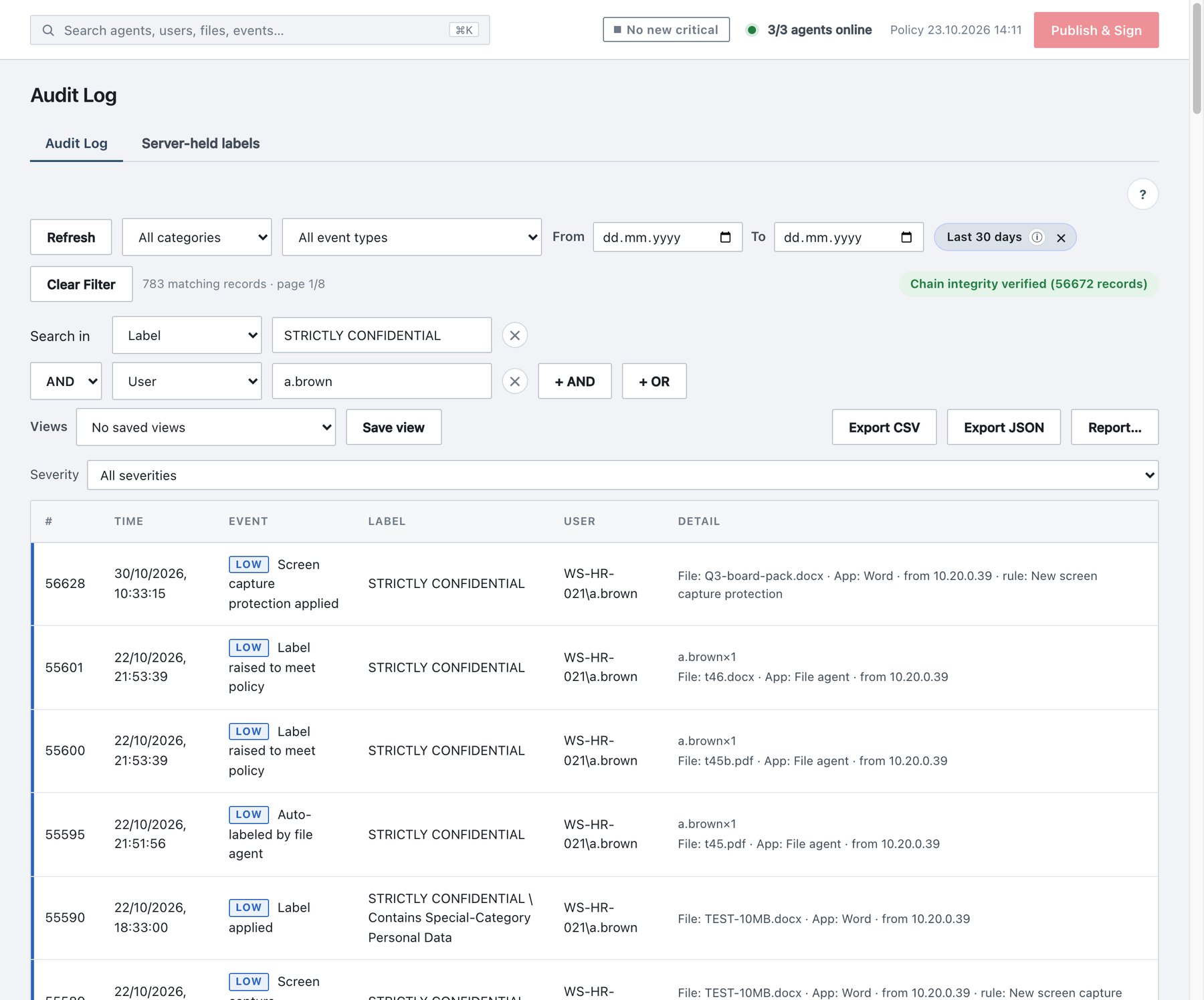
| Last 30 days chip | Appears when you type a search with From and To empty: the search is limited to the last 30 days. ✕ switches to All time. | default for searches |
| Clear Filter | Resets category, event, severity, dates and search. | shown when any filter is set |
| Severity | Limits to one severity level. | All severities (default), Critical, High, Medium, Low, Informational. Choosing a severity overrides the category filter. Informational selects the Administration category. |
15.3.3 Searching (Search in, AND / OR)
The Search in row builds one or more conditions. Each condition is a column plus text; matching is “contains”.
| Search in | Fields searched | Placeholder |
|---|---|---|
| All columns | The whole record | Search the whole record… |
| User | labeledBy, by, username, user, targetUsername | User name (e.g. CLIENT\Administrator)… |
| Event | event id | Event id (e.g. save_blocked)… |
| Label | labelName, subLabelName, labelId | Label or sub-label name… |
| File | fileName, filePath, itemName (mail subject) | File name, path or mail subject… |
| Machine | host, hostname, sourceAgent, machine | Host name, machine or agent… |
| IP | ip | Source IP… |
| Rule | ruleName | Classification rule name… |
| Trace code | traceCode | 6-character watermark code… |
To combine conditions:
- Fill the first row.
- Click + AND or + OR on the last row to add another condition, and choose its column and text. The operator can be changed on each added row.
- Remove a row with ✕.
AND binds tighter than OR: Label contains “Confidential” AND User contains “j.smith” OR Rule contains “IBAN” means (Label ∧ User) ∨ Rule. The server accepts up to 20 conditions of up to 200 characters each. The list re-queries 0.3 seconds after you stop typing.
Language-safe matching. Both sides of every comparison are Unicode-normalised (NFC) and case-folded with the dotted/dotless i distinction removed (İ, I, ı, i all match). A file name reported by a macOS agent (decomposed Unicode) therefore matches the same name typed on Windows, and “ISTANBUL”, “İstanbul” and “istanbul” match each other. Stored records are never changed — only the comparison is normalised, so the hash chain is unaffected.
Finding a printed or photographed trace code. Choose Search in → Trace code and type the code (or type it into the ⌘K palette). The matching Print traced or Screen watermark shown record names the user, machine, document and, for prints, printer and page count.
15.3.4 Saved views
A view stores the current filter under a name.
- Set a filter (Save view is disabled until one is set).
- Click Save view and enter a name (max 60 characters).
- Apply it later from Views → Select a saved view…; delete it with Delete view… (asks for confirmation).
| Rule | Value |
|---|---|
| Visibility | Personal — each user sees only their own views. Auditors can save views too. |
| Same name | Overwrites your existing view of that name. |
| Limit | 50 views per user. |
| What is stored | Category, event type, date/from/to, and the search conditions. |
Saved views can also be applied as the scope of a report (section 15.4).
15.3.5 Chain integrity
The right end of the toolbar shows the result of a full verification of the hash chain, run each time the list loads:
- Chain integrity verified (N records) — every record still links to its predecessor.
- CHAIN BROKEN — record #N (possible tampering!) — a record was altered or removed outside the product. This also raises the Audit chain break alert (section 15.5) and turns the Audit chain card on Administration → Status to BROKEN.
When old records are removed by the retention purge (Administration → Settings → Database, default 1 year), the server keeps a chain anchor, so the remaining log still verifies from the anchor onward.
15.3.6 Exporting
Export CSV and Export JSON download
every record that matches the current filter (including
the default 30-day search window if it is active), not just the visible
page. The file streams from the server; there is no row limit unless the
server operator has set one (environment variable
ADA_EXPORT_MAX_RECORDS).
| CSV | JSON | |
|---|---|---|
| File name | ada-audit-YYYY-MM-DD-HH-MM-SS.csv |
ada-audit-YYYY-MM-DD-HH-MM-SS.json |
| Encoding | UTF-8 with BOM, ; separator, CRLF — opens directly in
Excel with correct characters |
UTF-8 |
| Content | 29 columns: Seq, Time (zone), Event id, Event name, Category, Severity, Label, Label id, Sub-label, User, Target, Machine, File / item, Path, Item, Application, Sign-in, Reason, IP, Channel, Rule, Trace, Justification, Service, Command, Agent, Details, Detail, Chain hash | The raw stored records (sequence, receive time, record body, chain
hash) plus the computed severity |
| Use | Spreadsheet analysis | Evidence, SIEM import |
- Times in the CSV are in the configured time zone; the JSON keeps UTC.
- Channel shows whether the record came from a signed
agent (
agent) or from an Office web add-in task pane (web). - Cell values starting with
=,+,-,@, tab or CR are prefixed with'so spreadsheet programs do not execute them as formulas. - Each export writes an
audit_exportedrecord (who, format, count, filter). - Report… opens Reports with the Audit Log Extract pre-selected and the current category, event type, search conditions and dates carried over, so the same data can be downloaded as PDF, e-mailed or scheduled. (Severity is not carried over.)
15.3.7 Drill-down from other pages
Clicks on the Overview, the top-bar critical chip and the ⌘K palette open the Audit Log with a preset filter. The preset appears as normal filter values and chips; remove them with ✕ or Clear Filter.
15.3.8 Roles and retention
- Auditors (read-only) can read, filter, export and save personal views.
- Retention: records older than the retention window
are purged on schedule. Configure it under Administration →
Settings → Database (default 1 year, up to 5 years; Purge
now asks for your password; every purge writes
audit_retention_purged).
15.3.9 Server-held labels
Activity → Audit Log → Server-held labels lists files whose label could not be written into the file (for example a PDF protected with an owner password). The label is stored on the server, keyed by the file’s content hash, and agents enforce it from their local cache.
| Column | Content |
|---|---|
| File | File name (tooltip: content hash). Identical copies share one entry. |
| Label | Label and sub-label from the current policy. |
| Reason | Why the label could not be embedded. |
| Size, Classified by, Updated | File size, the user who classified it, last change. |
The list is read-only; entries come only from agents. A copy opened on a machine without Ada carries no label. Refresh reloads it.